Originally by ShugeX, an independent AI-ops practitioner and active Milvus community contributor. Translated and republished with permission.
Imagine you're using Claude Code to build a RAG app with Milvus. Every step — creating a collection, defining a schema, inserting vectors, running hybrid search — sends you flipping through pymilvus docs to find the right API, then back to the editor to wire it in. And if you're on Zilliz Cloud, you're also bouncing to the browser to log into the console for cluster management, monitoring, and backup config. The dev environment and the ops environment are two different worlds.
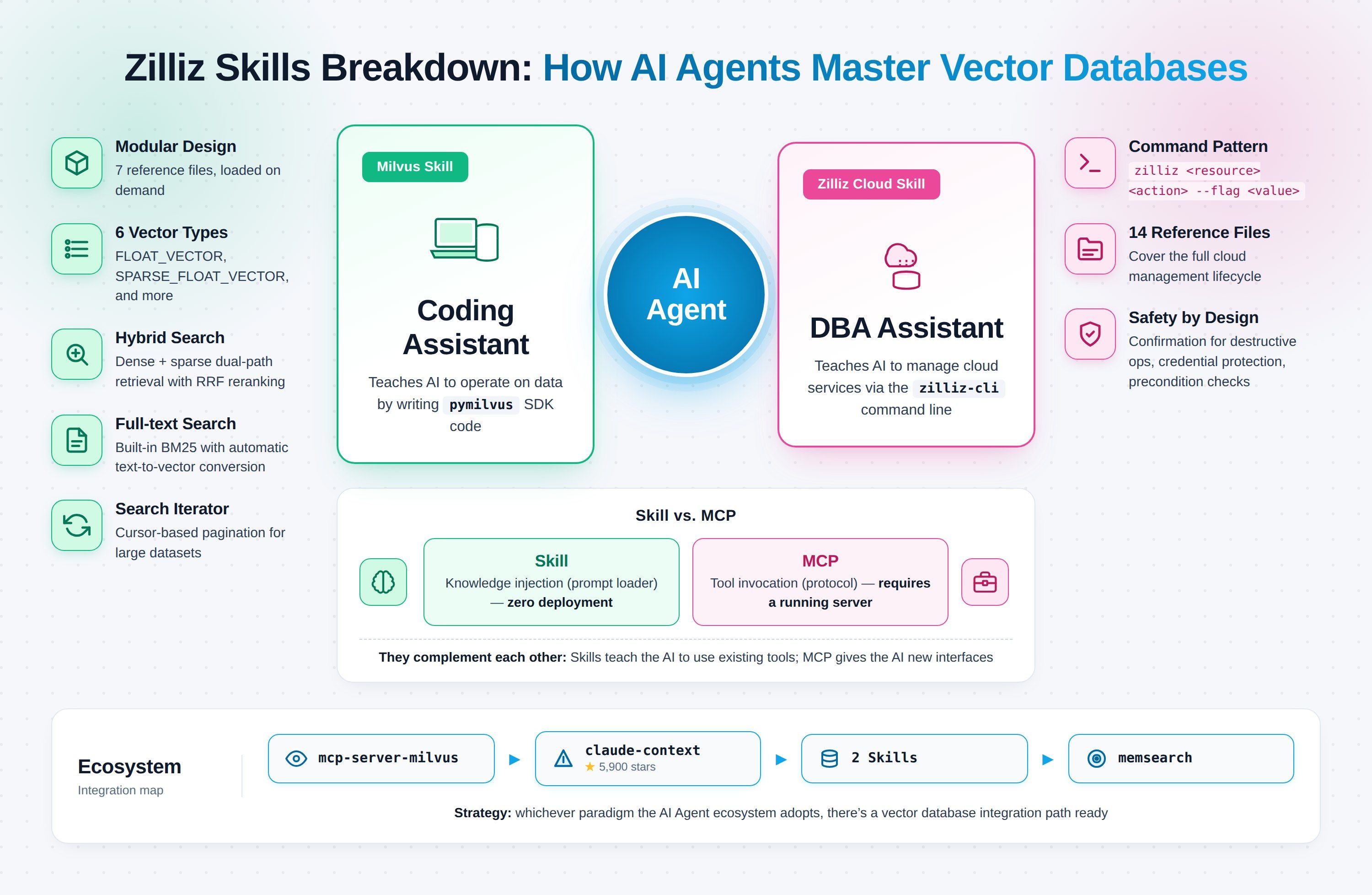
Zilliz's two recent Claude Code Skills target exactly that break point. Milvus Skill teaches the agent to operate the vector database through the Python SDK. Zilliz Cloud Skill teaches the agent to manage everything on the cloud-side through zilliz-cli. Each Skill handles one domain; together they turn dev and ops into one continuous Claude Code session.
After reading through both Skills' source code end to end, I found plenty worth unpacking — modular design, safety patterns, and where Skill fits alongside MCP. This article walks through each.
What Milvus Skill and Zilliz Cloud Skill Each Do
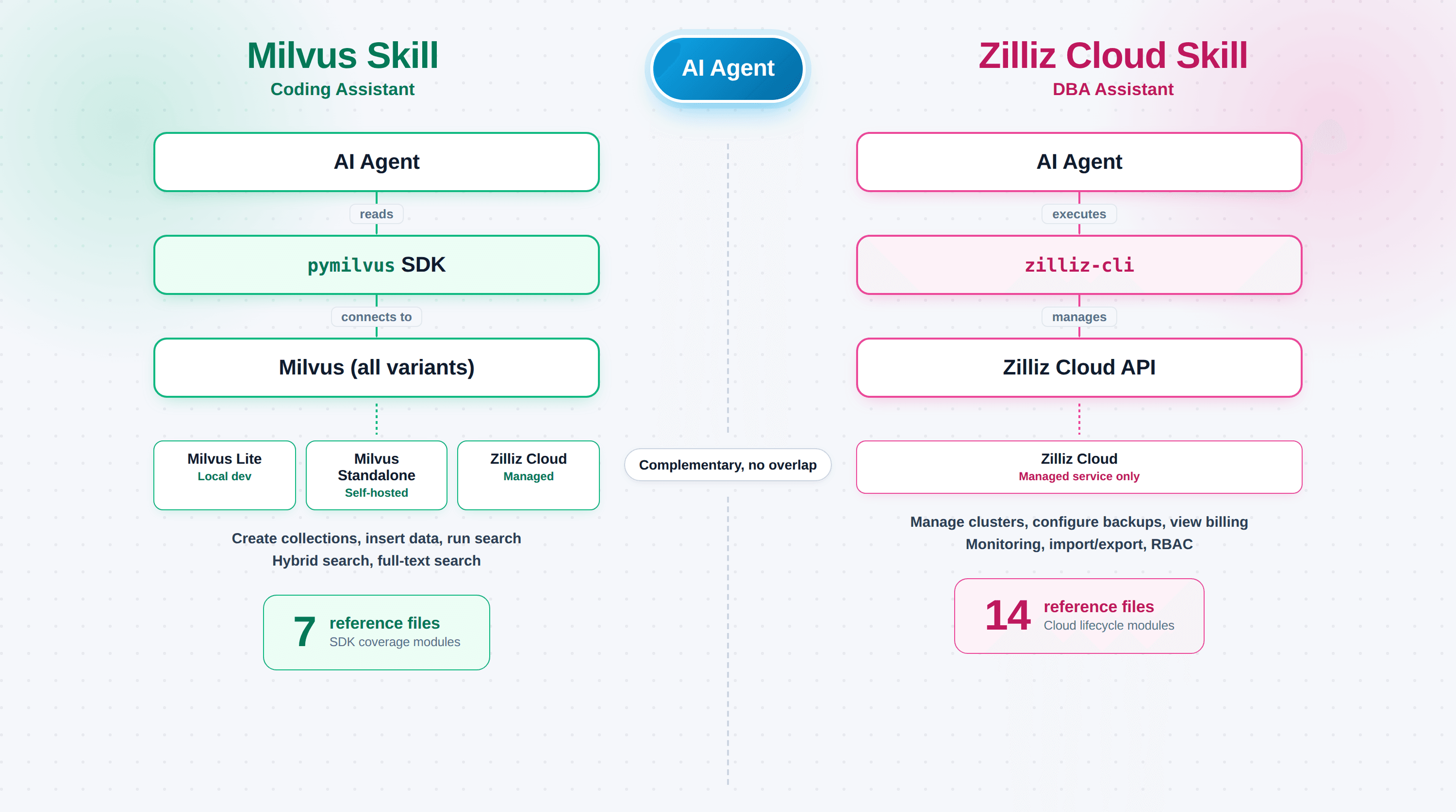
The two Skills aren't two versions of one thing. They target two different correctness failures.
Milvus Skill (zilliztech/milvus-skill) teaches the agent pymilvus, the Python SDK to connect, create collections, insert vectors, and run searches. It's a coding assistant, and it works against any Milvus deployment: Milvus Lite, self-hosted Standalone/Cluster, or Zilliz Cloud. The failure it fixes: pymilvus code that compiles but doesn't do what you asked because the agent used a stale API shape.
Zilliz Cloud Skill (zilliztech/zilliz-skill) teaches the agent zilliz-cli, the command-line tool that covers clusters, backups, monitoring, and billing. It's a DBA assistant, and it only works against Zilliz Cloud (self-hosted Milvus has no control plane). The failure it fixes: hallucinated commands against a live production system, where a bad zilliz cluster delete costs more than a compile error.
One-liner:
- Milvus Skill → agent writes code that operates data
- Zilliz Cloud Skill → agent runs commands that manage services
| Dimension | Milvus Skill | Zilliz Cloud Skill |
|---|---|---|
| Interface | Python (pymilvus) | CLI (zilliz-cli) |
| Role | Coding assistant | DBA assistant |
| Works against | All Milvus deployments + Zilliz Cloud | Zilliz Cloud only |
| Files | 7 reference modules | 14 sub-skills |
| Correctness target | Stale SDK APIs | Under-documented ops commands |
| Typical task | Build collection, insert, search | Provision cluster, configure backup, check billing |
Milvus Skill's references/ folder holds seven files, each mapping to an independent pymilvus capability area. When the agent handles a specific task, it loads only the relevant file rather than dumping every doc into context:
| File | Covers |
|---|---|
collection.md | Data types, field definitions, collection operations |
vector.md | Vector CRUD, hybrid search, full-text search, iterators |
index.md | Index types, metric types, index management |
partition.md | Partition management |
database.md | Database management |
user-role.md | RBAC |
patterns.md | Common patterns (RAG, hybrid search, etc.) |
Building a schema? The agent pulls collection.md. Running a search? It pulls vector.md. The rest stays out. Context windows are finite; on-demand loading beats dumping everything.
Skimming collection.md, Milvus supports more vector types than most devs realize:
- Scalars:
BOOL,INT8/16/32/64,FLOAT,DOUBLE,VARCHAR,JSON,ARRAY - Vectors:
FLOAT_VECTOR— 32-bit float, the defaultFLOAT16_VECTOR— half-precision, saves memoryBFLOAT16_VECTOR— BF16, common in deep learning pipelinesBINARY_VECTOR— binarySPARSE_FLOAT_VECTOR— sparse, for full-text searchINT8_VECTOR— quantized, further compression
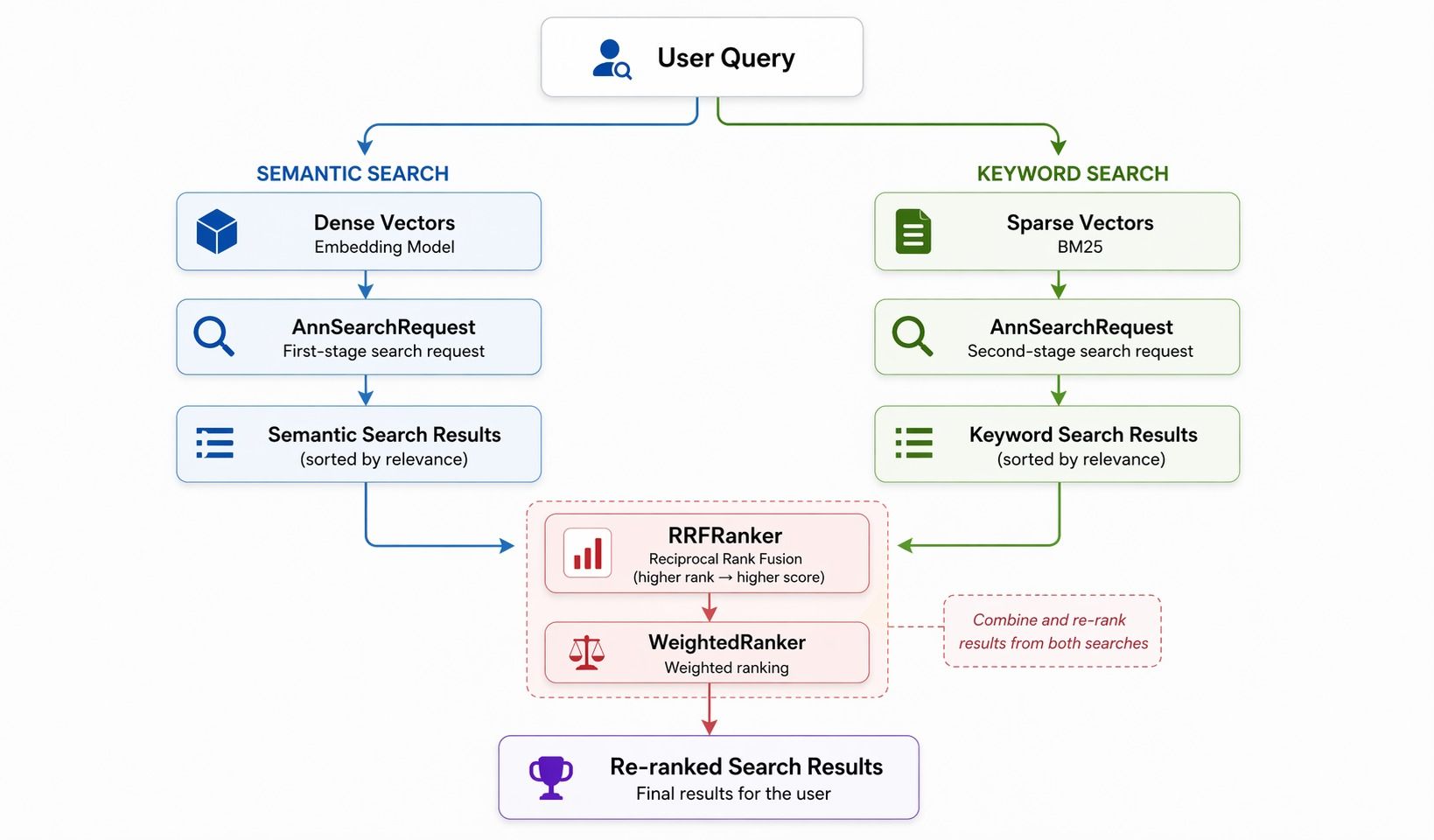
patterns.md documents four common patterns. Hybrid search has the most parts. Dense-vector search (semantic) and sparse-vector search (keyword) run in parallel, then RRF (Reciprocal Rank Fusion) or weighted ranking merges the two lists.
Three building blocks:
AnnSearchRequest— one per search branchRRFRanker/WeightedRanker— fusion strategySPARSE_FLOAT_VECTOR— the sparse-vector field
RRF is simple: for each result, score = 1/rank, summed across branches. Higher-ranked items win. WeightedRanker is a weighted sum per branch. The Skill spells this out, so the agent generates usable hybrid-search code without the developer reading the RRF paper.
Milvus Skill also encodes: Milvus 2.5's built-in Sparse-BM25 full-text search. Combined with Function and FunctionType.BM25, Milvus converts raw text into sparse vectors internally, skipping external embedding models and manual TF-IDF pipelines.
Pre-2.5, full-text search meant you wrangled a tokenizer, computed TF-IDF by hand, and generated the sparse vector yourself. Now you tell the agent what you want, and the Skill guides it to generate the collection with BM25 Function wired up correctly.
vector.md also covers search_iterator and query_iterator, cursor-style pagination for million- or billion-row collections. A plain search returns a fixed-size result set. Iterators page through without drops or duplicates, which is what full enumeration needs.
Zilliz Cloud Skill's job is different from Milvus Skill's. Instead of writing Python, the agent composes CLI invocations against a live control plane — and because a bad command can wipe production, the Skill wraps those invocations in safety rules.
Command Mode: How the Agent Composes CLI Invocations
The Skill encodes a consistent command shape:
zilliz <resource> <action> --flag <value>
Examples:
zilliz cluster list— list all clusterszilliz collection create --name my_collection— create a collectionzilliz backup create --name daily-backup— create a backup
Three output formats: json (machine-readable), table (human-friendly), text (plain). The agent picks whichever fits.
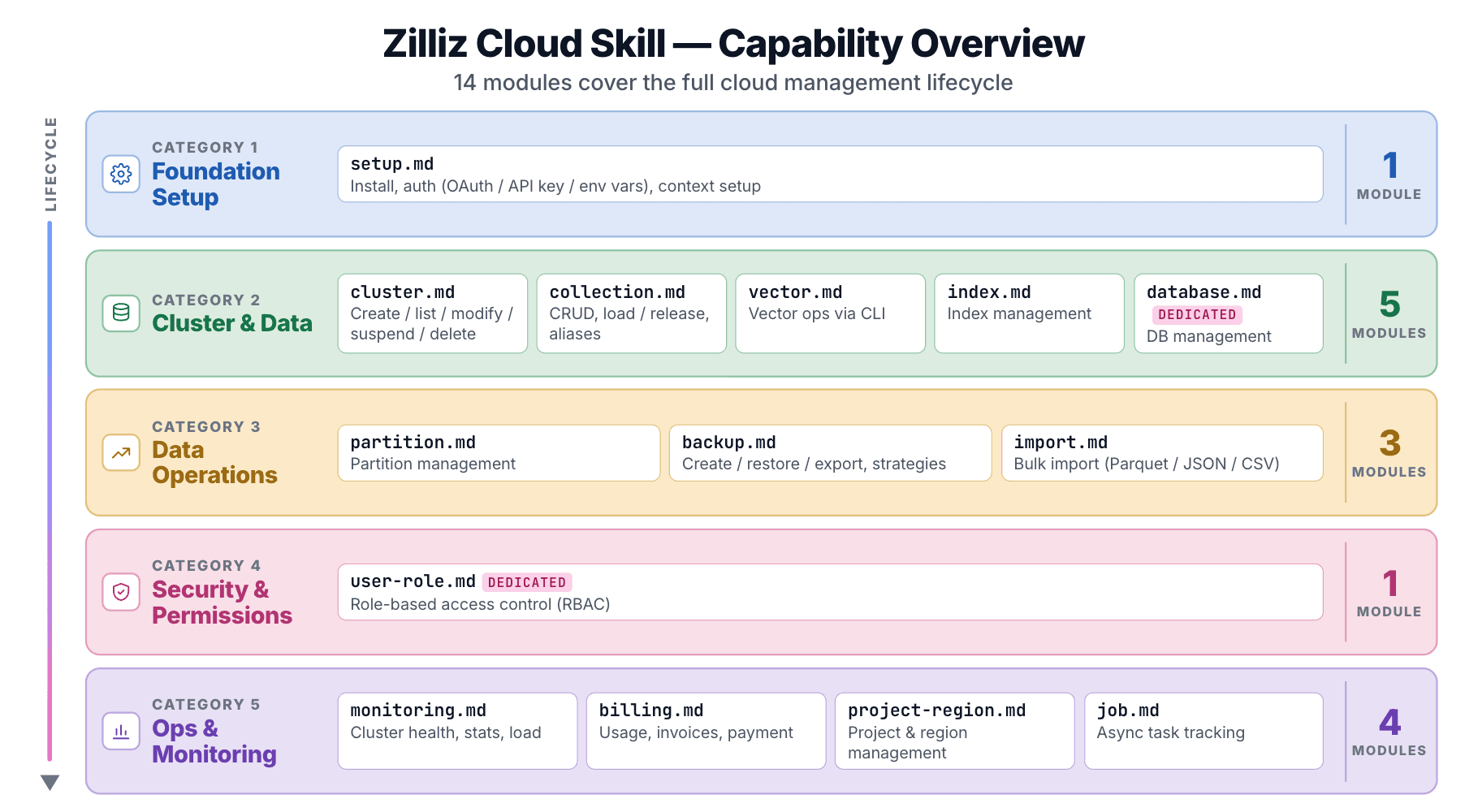
The zilliz-plugin repo ships 14 sub-skills, each under skills/<name>/SKILL.md:
| Module | Covers |
|---|---|
setup | Install, auth (OAuth / API Key / env var), context setup |
cluster | Create, list, modify, suspend, resume, delete |
collection | Collection CRUD, load/release, aliases |
vector | Vector ops via CLI |
index | Index management |
database | Database management (Dedicated only) |
partition | Partition management |
user-role | RBAC (Dedicated only) |
backup | Create, restore, export, backup policies |
import | Bulk import from cloud storage (Parquet / JSON / CSV) |
billing | Usage, invoices, payment methods |
monitoring | Cluster status, stats, load states |
project-region | Project and region management |
job | Async task tracking |
Spinning up a cluster, configuring backup retention, checking an invoice: 14 modules cover every Zilliz Cloud console operation.
Tier awareness is built in. database and user-role are flagged Dedicated only. The Skill knows Free, Serverless, and Dedicated tiers have different capabilities, so the agent won't attempt operations a cluster tier can't support.
Zilliz Cloud Skill's safety design goes several layers deeper than Milvus Skill's. Three core rules show up across the individual SKILL.md files:
- Destructive operations require explicit user confirmation. The cluster module's guidance reads: "Before deleting a cluster, always confirm with the user — this is irreversible." Every destructive op (collections, backups, databases, users) carries the same instruction.
- Sensitive commands run in the user's own terminal. The
setupmodule is explicit: "Login commands (zilliz login, zilliz configure) require an interactive terminal and CANNOT run inside Claude Code. Always instruct the user to run these in their own terminal." Credentials don't flow through the agent. - Credentials never surface. Auth routes through OAuth browser flow, an API key from the console, or a
ZILLIZ_API_KEYenv var. The Skill never prints secrets.
These sound basic, but an agent with Cloud credentials and no confirmation layer could take "clean up the test clusters" and nuke production. The Skill closes that gap at the instruction layer, before any destructive command reaches the API.
The Prereq Gate: Three Checks Before Any Command Runs
Every sub-skill runs a three-step check, defined in skills/setup/SKILL.md:
zilliz-cliinstalled? If not, install.- User logged in? If not, route to auth.
- Cluster context set? If not, prompt selection.
The gate ensures the environment is ready before any command fires, which is more reliable than firing blind and debugging errors after.
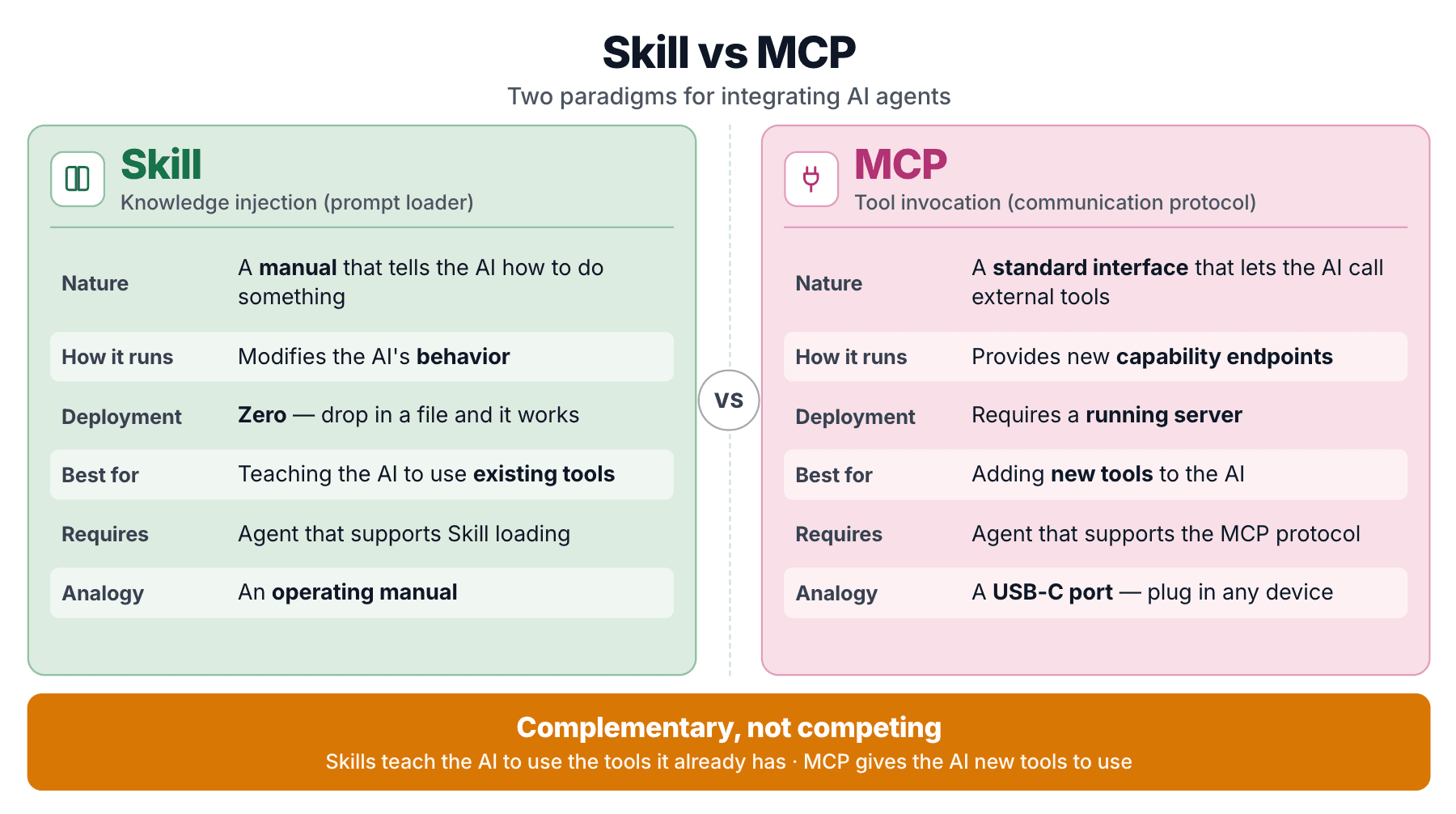
Zilliz ships both because they solve different problems. A Skill injects knowledge the agent consults when writing code. An MCP server exposes callable endpoints the agent can invoke. mcp-server-milvus is the MCP arm; Milvus Skill is the knowledge arm. They layer rather than compete.
The minimum Skill is a folder and a SKILL.md:
my-skill/
├── SKILL.md
├── references/
├── scripts/
└── assets/
SKILL.md is an instruction manual. It tells the agent how to handle a given task. No executable code, no server process. Just structured knowledge injected into the model's context on demand.
A Skill is a prompt loader. Domain knowledge packaged as a structured prompt, loaded dynamically.
MCP (Model Context Protocol) takes a different shape. It's a standardized protocol that lets an agent call external tools through a uniform interface. mcp-server-milvus is an MCP server that exposes tool endpoints like milvus_text_search, milvus_create_collection, and so on.
MCP has been described as "the USB-C port for AI agents." It solves the tool-interface standardization problem.
| Dimension | Skill | MCP |
|---|---|---|
| Essence | Knowledge injection (prompt) | Tool invocation (protocol) |
| What it does | Modifies how the agent behaves | Gives the agent a new capability |
| Deploy cost | Drop files, done | Server process required |
| Fits | Teaching the agent to use tools it already has | Giving the agent tools it doesn't have |
| Dependency | Agent supports Skill loading | Agent supports MCP |
The load-bearing distinction: Milvus Skill teaches the agent to use pymilvus. pymilvus already exists. The Skill doesn't add capability. It fixes correctness for capability the agent already has. MCP, by contrast, gives the agent callable endpoints it couldn't otherwise reach.
A Skill is an operating manual for a machine you already own. MCP is a remote control that makes a new machine move. Zilliz has said so directly in "Is MCP Dead? MCP vs CLI vs Agent Skills Compared": both patterns persist.
That said, Skills are catching on fast. Community trackers put the count at 700,000+ packages across registries, with ClawHub alone listing 5,700+ skills. One skill-package project on GitHub pulled 6,600 stars in five days in April 2026.
You're building a RAG app. With Milvus Skill installed, you say:
"Create a document retrieval collection: 768-dim vectors, BM25 full-text search, fields for title, body, and embedding."
The agent pulls collection.md and patterns.md and writes:
from pymilvus import MilvusClient, DataType, Function, FunctionType

client = MilvusClient(uri="<URI>", token="<TOKEN>")

schema = client.create_schema(auto_id=True)
schema.add_field("id", DataType.INT64, is_primary=True)
schema.add_field("title", DataType.VARCHAR, max_length=512)
schema.add_field("body", DataType.VARCHAR, max_length=4096, enable_analyzer=True)
schema.add_field("embedding", DataType.FLOAT_VECTOR, dim=768)
schema.add_field("body_sparse", DataType.SPARSE_FLOAT_VECTOR)


schema.add_function(Function(
    name="body_bm25",
    input_field_names=["body"],
    output_field_names=["body_sparse"],
    function_type=FunctionType.BM25,
))

index_params = client.prepare_index_params()
index_params.add_index(field_name="embedding", index_type="AUTOINDEX", metric_type="COSINE")
index_params.add_index(field_name="body_sparse", index_type="AUTOINDEX", metric_type="BM25")

client.create_collection("documents", schema=schema, index_params=index_params)
enable_analyzer=True, the BM25 Function wiring, the AUTOINDEX-with-BM25 metric combo: none of these are things you want the agent guessing at. The Skill encodes them.
"Create a Serverless cluster in us-east-1, then create a collection with 768-dim vectors."
The agent runs the prereq check, then issues the CLI commands in order. Or:
"Show me the status and resource usage of all my clusters."
The agent runs zilliz cluster list and the matching zilliz monitoring commands, then summarizes. Credentials never leave your terminal.
Scenario 3: Backups and data migration
"Set up a daily backup policy for production, keep 7 days."
backup.md documents the full policy syntax. The agent configures the policy directly.
"Export the orders collection from the test cluster to S3."
import.md covers bulk import and export from cloud storage, including the supported formats (Parquet, JSON, CSV).
"Upgrade my search to dense + sparse hybrid with RRF."
The agent pulls vector.md's notes on AnnSearchRequest and RRFRanker and writes the hybrid-search code. You don't need to study RRF parameters.
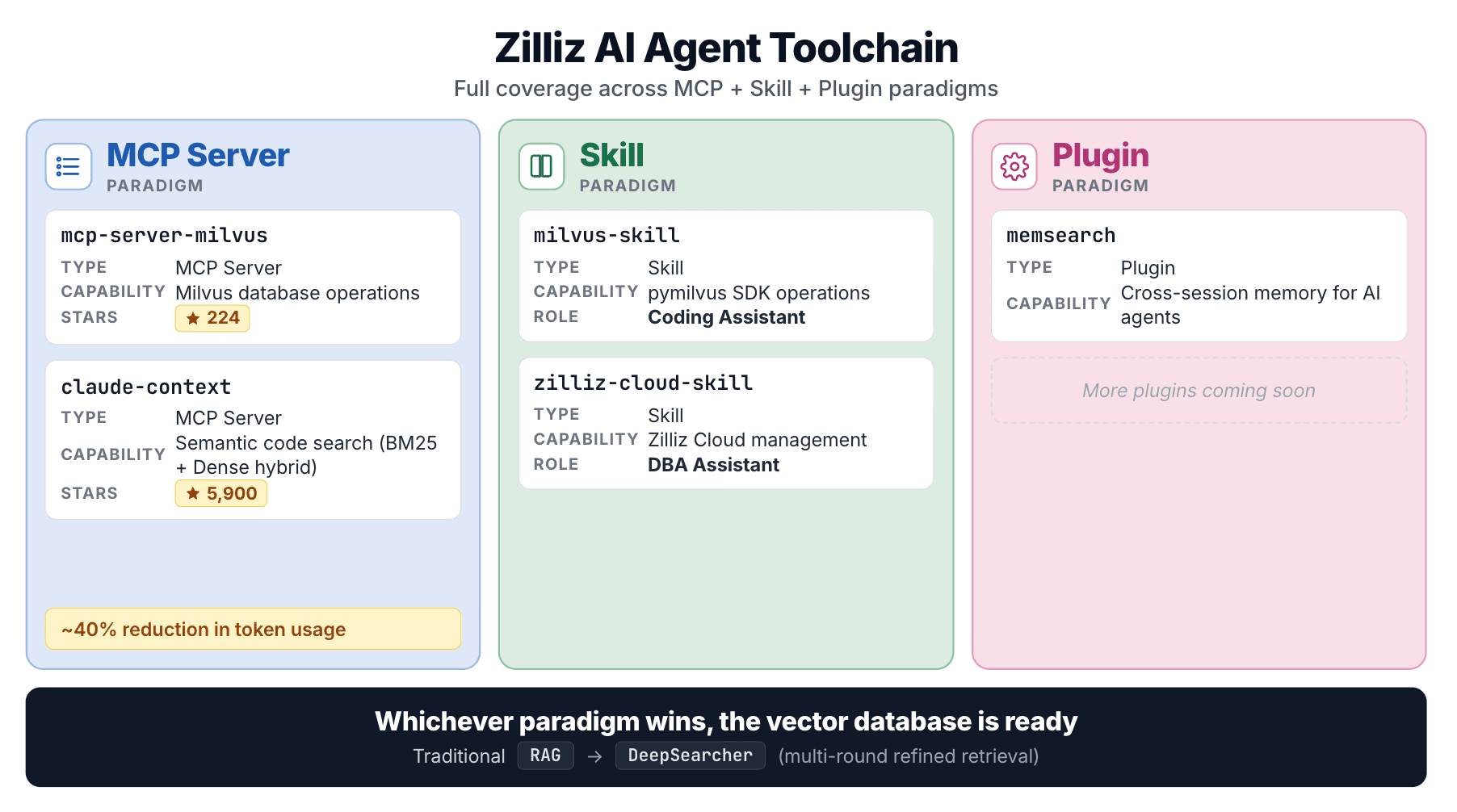
These two Skills sit inside a broader Zilliz effort across every agent-integration pattern:
claude-context is the standout. It indexes a codebase in a vector DB, retrieves relevant code on demand with hybrid (BM25 + dense) search, and reports ~40% token reduction under equivalent retrieval quality.
From MCP to Skill to code search to agent frameworks, Zilliz's strategy is consistent: whichever agent-integration pattern wins, a vector database should have a first-class entry point. The two Skills are Zilliz's entry into that lane.
Milvus Skill and Zilliz Cloud Skill lean on four design choices in common:
- The two Skills have clear, non-overlapping roles. Milvus Skill handles the SDK-coding layer; Zilliz Cloud Skill handles the CLI-ops layer. Together, they cover the full vector-database lifecycle without stepping on each other.
- Modular knowledge loading keeps context lean. Splitting knowledge across 7 and 14 reference files lets the agent pull only the file that matches the current task, rather than flooding the context window with every doc.
- Zilliz Cloud Skill builds safety into the instruction layer. Destructive-op confirmation, credential protection, and prereq checks show the team thought carefully about what an agent with Cloud keys can do to a live database.
- Zilliz is hedging across paradigms, not picking a winner. By shipping both MCP and Skill implementations, Zilliz has coverage whichever direction the agent-integration ecosystem moves.
If you're building agents against a vector DB, install both Skills next time you spin up a RAG app or manage a cluster.
Install the two Skills in your next Claude Code session:
- Milvus Skill — pymilvus correctness. Works against Milvus Lite, self-hosted Standalone/Cluster, and Zilliz Cloud.
- Zilliz Cloud Skill — live cluster management through
zilliz-cli. Install the CLI alongside.
If you don't have a cluster yet, sign up for Zilliz Cloud (new work-email accounts get free credits) or sign in, then paste the Skill into Claude Code, and the agent takes it from there.